Freelens: Taking back control of your Kubernetes clusters with a truly open-source desktop client
Managing Kubernetes clusters entirely from the command line is a rite of passage. We have all typed kubectl get pods -n kube-system more times than we care to admit. But when you are troubleshooting a cascading failure across multiple namespaces at 3:00 AM, staring at raw JSON or

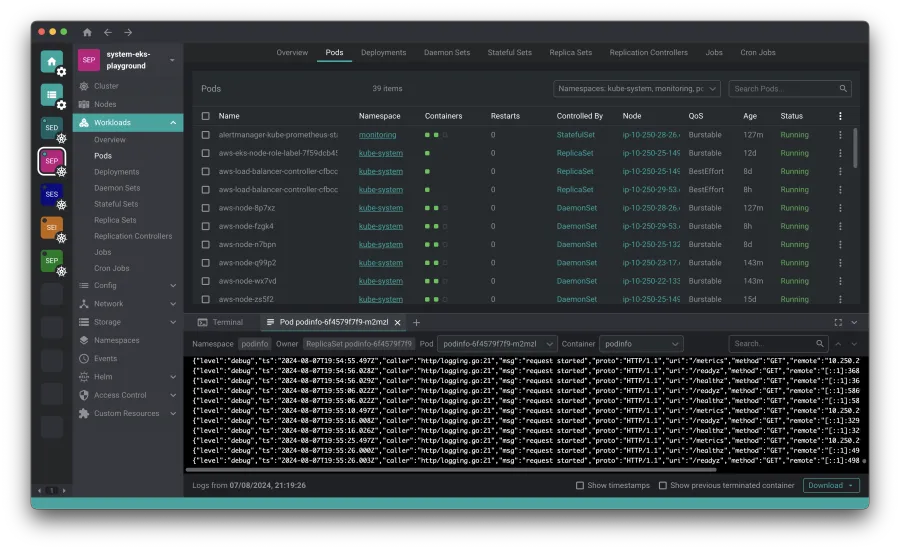
Freelens: Taking back control of your Kubernetes clusters with a truly open-source desktop client
Managing Kubernetes clusters entirely from the command line is a rite of passage. We have all typed kubectl get pods -n kube-system more times than we care to admit. But when you are troubleshooting a cascading failure across multiple namespaces at 3:00 AM, staring at raw JSON or squinting at nested YAML in a terminal window isn't just exhausting—it is a liability.
Enter Freelens, a free, open-source, cross-platform desktop application designed to take the squinting out of Kubernetes administration.
Why Freelens? The open-source alternative we actually need
If Freelens looks familiar, that is because it is a direct fork of OpenLens, the open-source core that originally powered Mirantis's popular Lens Desktop. When the commercial version of Lens began locking features behind paywalls and subscription models, the community did what the community does best: they forked it.
Freelens is built to preserve the dream of a powerful, unrestricted, and highly extensible Kubernetes IDE. It runs locally on your machine, respects your existing kubeconfig files, and does not require you to sign up for a cloud account just to view your local development clusters.
Installation guide
Freelens is built using Electron, meaning it runs natively across macOS, Linux, and Windows. Below is the breakdown of how to get it running on your machine of choice.
macOS
Freelens requires macOS 12 (Monterey) or later. The project provides native binaries for both Apple Silicon (arm64 for M1/M2/M3 chips) and Intel (amd64) architectures.
The quick way (Homebrew)
If you use Homebrew, you can install the cask with a single command:
brew install --cask freelens
Manual installation
Alternatively, you can download the .dmg or .pkg installers directly from the Freelens Releases page.
Linux
To run Freelens on Linux, your system must have GNU C Library (glibc) 2.34 or later. This is standard on modern distributions such as Debian 12, Fedora 35, Ubuntu 22.04, Arch Linux, and their derivatives.
Flatpak (Recommended for sandboxed security)
The Flatpak package is hosted on Flathub. It comes bundled with kubectl and helm, and automatically reads your local ~/.kube/config.
To install and run it:
flatpak install flathub app.freelens.Freelens
flatpak run app.freelens.Freelens
Note on Flatpak Sandboxing: Because Flatpak runs applications in an isolated environment, Freelens includes built-in wrappers to access host-installed CLI tools like aws, doctl, gke-gcloud-auth-plugin, and kubelogin. If you need to drop into a terminal within Freelens, it defaults to /bin/sh inside the sandbox, but you can configure it to use /app/bin/host-spawn to interact directly with your host system's shell.
Snap Store
For Ubuntu and other Snap-enabled distributions:
sudo snap install freelens --classic
APT repository (Debian/Ubuntu)
If you prefer native package management via apt, you can add the official repository:
# Add the repository signing key
curl -L https://raw.githubusercontent.com/freelensapp/freelens/refs/heads/main/freelens/build/apt/freelens.asc | sudo tee /etc/apt/keyrings/freelens.asc

# Add the source list
curl -L https://raw.githubusercontent.com/freelensapp/freelens/refs/heads/main/freelens/build/apt/freelens.sources | sudo tee /etc/apt/sources.list.d/freelens.sources

# Update and install
sudo apt update
sudo apt install freelens
Arch User Repository (AUR)
Arch users can find the precompiled binary package in the AUR under freelens-bin.
AppImage
If you prefer a portable executable, grab the .AppImage from the releases page. First, ensure you have the necessary fuse and compression libraries installed:
sudo apt install libfuse2 zlib1g-dev
Then, run the AppImage with the recommended flags to ensure smooth rendering under modern display servers (like Wayland) and to bypass sandbox-related GPU issues:
./Freelens*.AppImage --no-sandbox --ozone-platform-hint=auto --enable-features=WebRTCPipeWireCapturer --enable-features=WaylandWindowDecorations --disable-gpu-compositing
Windows
Freelens supports Windows 10 or later, offering native builds for both x64 and arm64 architectures.
WinGet (Windows Package Manager)
You can install Freelens silently using Microsoft's native package manager:
winget install Freelensapp.Freelens
Tip: Use the --scope machine flag if you want to install it globally to C:\Program Files instead of the local user directory.
Scoop
If you prefer the developer-focused Scoop installer:
scoop bucket add extras
scoop install freelens
Portable and manual installers
If you prefer a zero-installation footprint, download the Portable EXE from the releases page. Standard .exe (NSIS) and .msi installers are also available.
Extending Freelens
One of the greatest strengths of the original OpenLens ecosystem was its extension API. Freelens maintains full compatibility with this ecosystem. Developers can easily port existing OpenLens extensions or write brand-new ones.
- Extensions Wiki: Check out the Freelens Extensions Wiki to see a list of community-supported extensions.
- Get Involved: If you have an extension you want to migrate or propose, join the discussion on GitHub Discussion #117.
- Documentation: Read the Freelens Docs to learn how to build your own custom UI components and integrations.
Development and contribution
Freelens is a community-driven project that welcomes contributors of all skill levels. Whether you want to fix a bug in the UI, optimize the build pipeline, or write documentation, your help is welcome.
- Building from source: If you want to hack on the codebase, follow the step-by-step guide on the Development Wiki.
- Contributing guidelines: Read the CONTRIBUTING.md file in the repository to understand the pull request process and coding standards.
Earn money by contributing
The Freelens project utilizes BountyHub, allowing community members to fund specific feature requests or bug fixes. Developers can claim these bounties by submitting successful pull requests that resolve the issues.
To learn more about how to fund an issue or get paid for your code, check out the Fund an issue or earn money by developing wiki page.
Meet the team
The rapid growth of Freelens is driven by a dedicated group of open-source maintainers:
Core Team
- Roberto Bandini (@robertobandini) – Founder: General management, community outreach, and product direction.
- Piotr Roszatycki (@dex4er) – Maintainer: Architecture, release engineering, and extension development.
- Mario Offertucci (@mariomamo) – Maintainer: UI/UX design, documentation, and AI integrations.
- Leopoldo Capuano (@leo-capvano) – Maintainer: Generative AI solutions and smart extension development.
Release Engineering Team
- Piotr Roszatycki (@dex4er) – Release Engineering Lead
- Omar Alani (@omarluq) – Release Engineering Member
- Matías Roje (@MatiasRoje) – Release Engineering Member
Community and support
Stay connected with the community, report bugs, or discuss new feature ideas through these channels:
- Chat & Discussion: Join the Discord Server or participate in GitHub Discussions.
- Social Media: Follow the project on Bluesky, X (formerly Twitter), and LinkedIn.
- Video Content: Watch tutorials and updates on YouTube.
- Issues: Spot a bug? Open an issue on the GitHub Issue Tracker.
If your organization uses Freelens, consider adding your name to the official Adopters List to show your support for sustainable open-source software.
License
Freelens is distributed under the permissive MIT License.