Is Your Kubernetes deployment failing at startup? The minReadySeconds property can help you
The problem? Your app relies on a database connection and needs a few precious seconds to load configurations. This scenario, my friends, is a recipe for disaster, potentially leading to errors, timeouts, and a whole lot of frustration for your users.
Explore the minReadySeconds property in Kubernetes and how it can be your secret weapon for deploying rock-solid, production-ready applications. We'll explore how setting an appropriate minReadySeconds value provides a crucial grace period for your apps to initialize and be ready to handle traffic, ensuring a smoother user experience.
Battling Startup Storms: The Need for Graceful Initialization
Picture this: you've just deployed a shiny new version of your web application to your Kubernetes cluster. Everything looks good - containers are starting up, and Kubernetes is doing its magic. But wait! Before your app has a chance to catch its breath, Kubernetes starts routing traffic its way. The problem? Your app relies on a database connection and needs a few precious seconds to load configurations. This scenario, my friends, is a recipe for disaster, potentially leading to errors, timeouts, and a whole lot of frustration for your users.
Think of minReadySeconds as that much-needed coffee break after a long vacation. It gives your application the breathing room it needs to start up smoothly and be fully prepared to handle the demands of the real world (or at least the real world of your users).
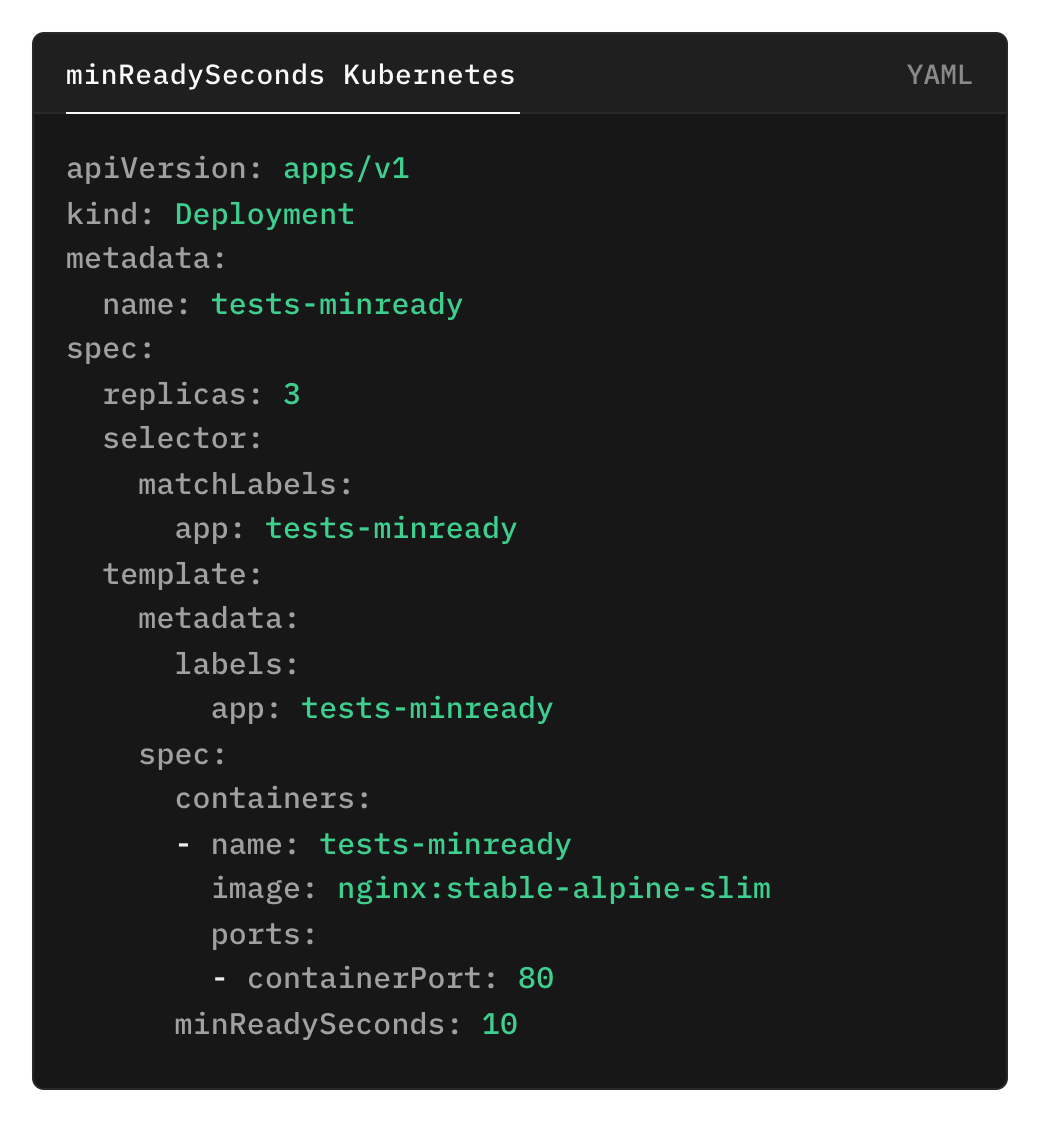
Example Deployment Configuration with minReadySeconds
minReadySeconds to the Rescue: A Time Buffer for Stability
This is where minReadySeconds swoops in to save the day! By setting this property in your Deployment configuration, you're essentially telling Kubernetes, "Hold your horses! Don't throw traffic at my pods until they've had at least this many seconds to get their act together."
Let's say you set minReadySeconds: 10. This means Kubernetes will patiently wait for 10 seconds after a pod's containers are reported as ready before considering it truly available to receive traffic. This grace period allows your app to:
Establish Database Connections: No more frantic connection attempts while traffic is already knocking.
Load Configurations: Ensures all settings are loaded before the first request hits.
Run Startup Tasks: Completes any initialization routines without the pressure of incoming traffic.
Reaping the Rewards: Stability, Reliability, and Happy Users
By incorporating minReadySeconds into your deployment strategy, you're not just adding a few seconds to your startup time – you're investing in a more stable and reliable application. Here's how:
Reduced Downtime: By preventing premature traffic routing, minReadySeconds minimizes the risk of errors and crashes during the critical startup phase, leading to less downtime and a smoother user experience.
Improved User Experience: No one likes staring at error messages. minReadySeconds helps ensure that your application is ready to provide a seamless and enjoyable experience from the moment users arrive.
Enhanced Reliability: A well-initialized application is a happy application (and a happy developer, for that matter). minReadySeconds adds an extra layer of reliability to your deployments, giving you peace of mind knowing your apps are truly ready for prime time.
Beyond the Basics: Fine-tuning for Optimal Performance
The ideal minReadySeconds value depends on your application's specific startup requirements. Analyze your application's initialization process to determine an appropriate value that provides sufficient warm-up time without unnecessarily delaying deployments.
Remember, Kubernetes provides a toolbox of powerful features, and minReadySeconds is just one of them. Explore other deployment strategies and best practices to further enhance the stability and resilience of your applications.
Ya sea que necesites gestionar un millón de H100s o solo quieras asegurarte de que tu agente de IA no tire un rm -rf / en producción, las actualizaciones del Next '26 de GKE sugieren que el futuro de la IA es, inevitablemente, un archivo YAML.