
kgateway: An amazing tool to simplify traffic management using Kubernetes API Gateway
Kgateway is a feature-rich, fast, and flexible Kubernetes-native ingress controller and next-generation API gateway. Built on top of the robust Envoy proxy and the Kubernetes Gateway API, Kgateway acts as a reverse proxy, providing a crucial security barrier between your clients and the microservices that constitute your


Kgateway is a feature-rich, fast, and flexible Kubernetes-native ingress controller and next-generation API gateway. Built on top of the robust Envoy proxy and the Kubernetes Gateway API, Kgateway acts as a reverse proxy, providing a crucial security barrier between your clients and the microservices that constitute your application.
Kgateway's Superpowers
Kgateway isn't just another API gateway; it's fully compliant with the Kubernetes Gateway API and extends its functionality with custom Gateway APIs like RoutePolicies, ListenerPolicies, and Backends. These resources allow for centralized configuration of advanced traffic management, security, and resiliency rules for an HTTPRoute or Gateway listener. In simpler terms, Kgateway gives you more control and flexibility over how traffic flows through your Kubernetes cluster.
Extensions and integrations
The kgateway project offers a range of extensions on top of the Kubernetes Gateway API, enabling advanced routing, security, and resiliency capabilities. Some of these extensions include:
- Access logging Security: Keep tabs on who's accessing what.
- AWS ALB and NLB Traffic: Seamlessly integrate with AWS load balancers.
- AWS Lambda Traffic: Route traffic to serverless functions.
- Buffering Traffic: Manage traffic spikes like a pro.
- Delegation Traffic: Delegate routing decisions for more granular control.
- Direct responses Traffic: Send direct responses without hitting a backend.
- Gateway customization Setup: Tailor the gateway to your specific needs.
- Integrations Setup: Integrate with other tools and services.
- Mirroring Resiliency: Mirror traffic for testing and debugging.
- Transformations Traffic: Modify requests and responses on the fly.
Default Gateway Proxy Setup: The Magic Behind the Scenes
When you create a Kubernetes Gateway resource, Kgateway automatically spins up, bootstraps, and manages gateway proxy deployments. This magic is achieved through a combination of Kgateway and Kubernetes resources, including GatewayClass, GatewayParameters, and a gateway proxy template that includes the Envoy configuration for each proxy.
For a deeper dive into the default setup and how these resources interact, check out the Default gateway proxy setup.
Example of a GatewayClass:
apiVersion: gateway.networking.k8s.io/v1
kind: GatewayClass
metadata:
  name: kgateway
spec:
  controllerName: kgateway.dev/kgateway
  description: KGateway Controller
  parametersRef:
    group: gateway.kgateway.dev
    kind: GatewayParameters
    name: kgateway
    namespace: kgateway-system
Deployment Patterns: Choose how to route your traffic
Kgateway's flexibility allows you to deploy it in a way that best suits your environment. Here are some recommended deployment patterns:
Simple Ingress: The Classic Approach
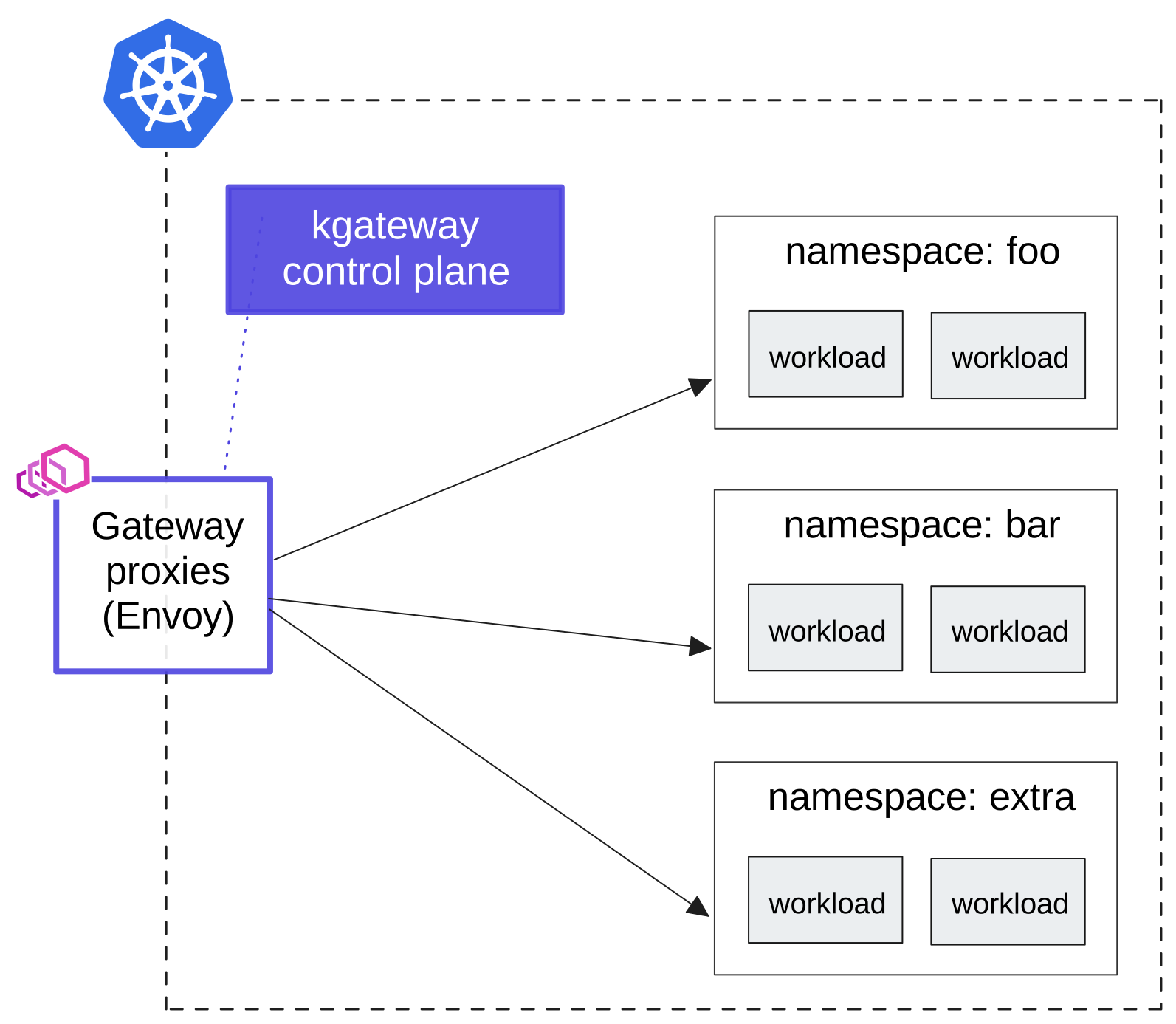
In this setup, a single Kgateway proxy serves as the ingress API gateway for all workloads in a Kubernetes cluster. It's centrally managed by the Kgateway control plane and configured to match and forward traffic based on your defined rules. This is a great starting point for smaller environments where all workloads run in a single cluster.
Sharded Gateway: Divide and Conquer
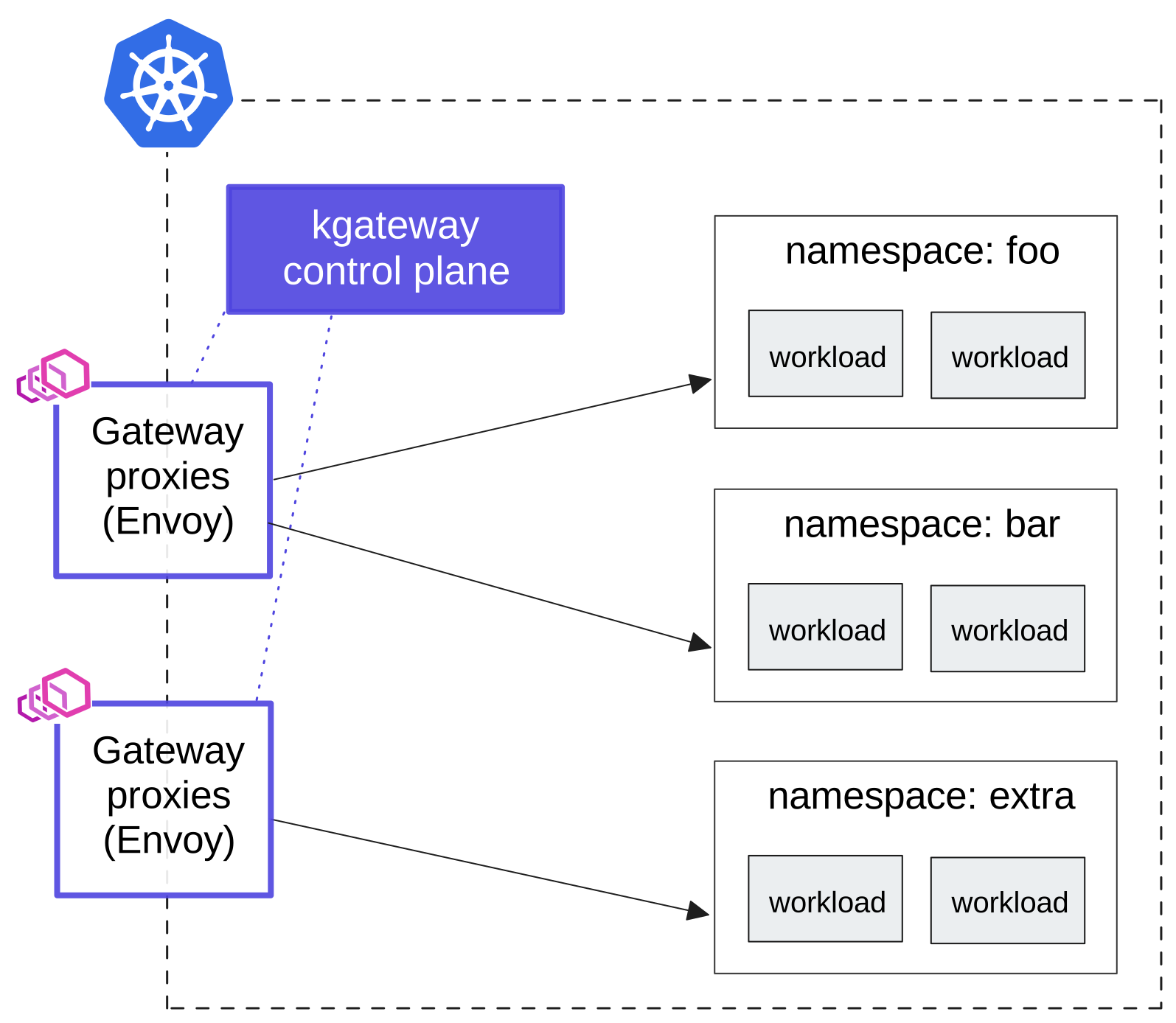
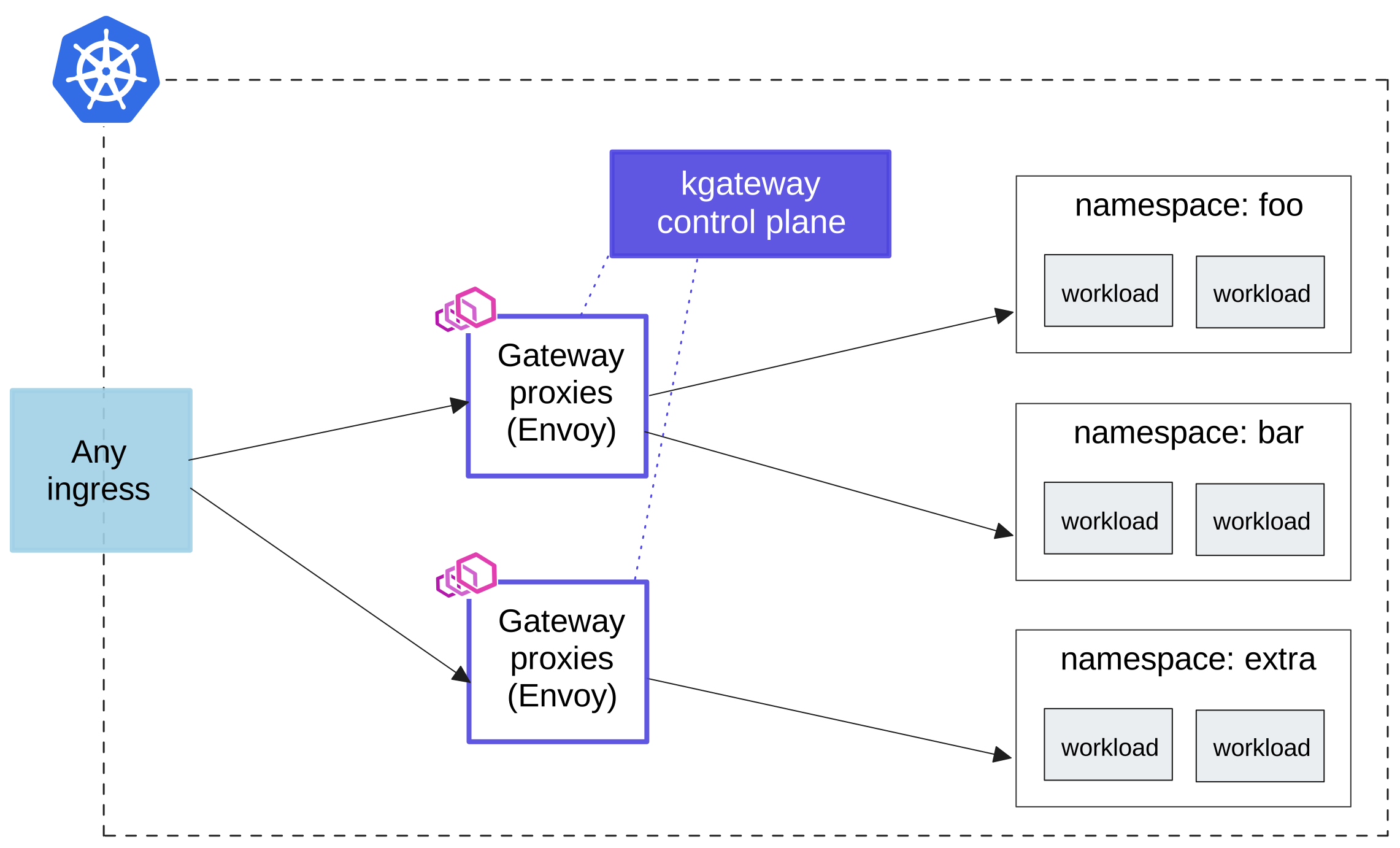
For larger environments or those with both high and low traffic services, a sharded gateway can help isolate services and protect against noisy neighbors. Multiple gateway proxies split the traffic for different services, providing better load balancing and isolation.
Sharded Gateway with Central Ingress: The Best of Both Worlds
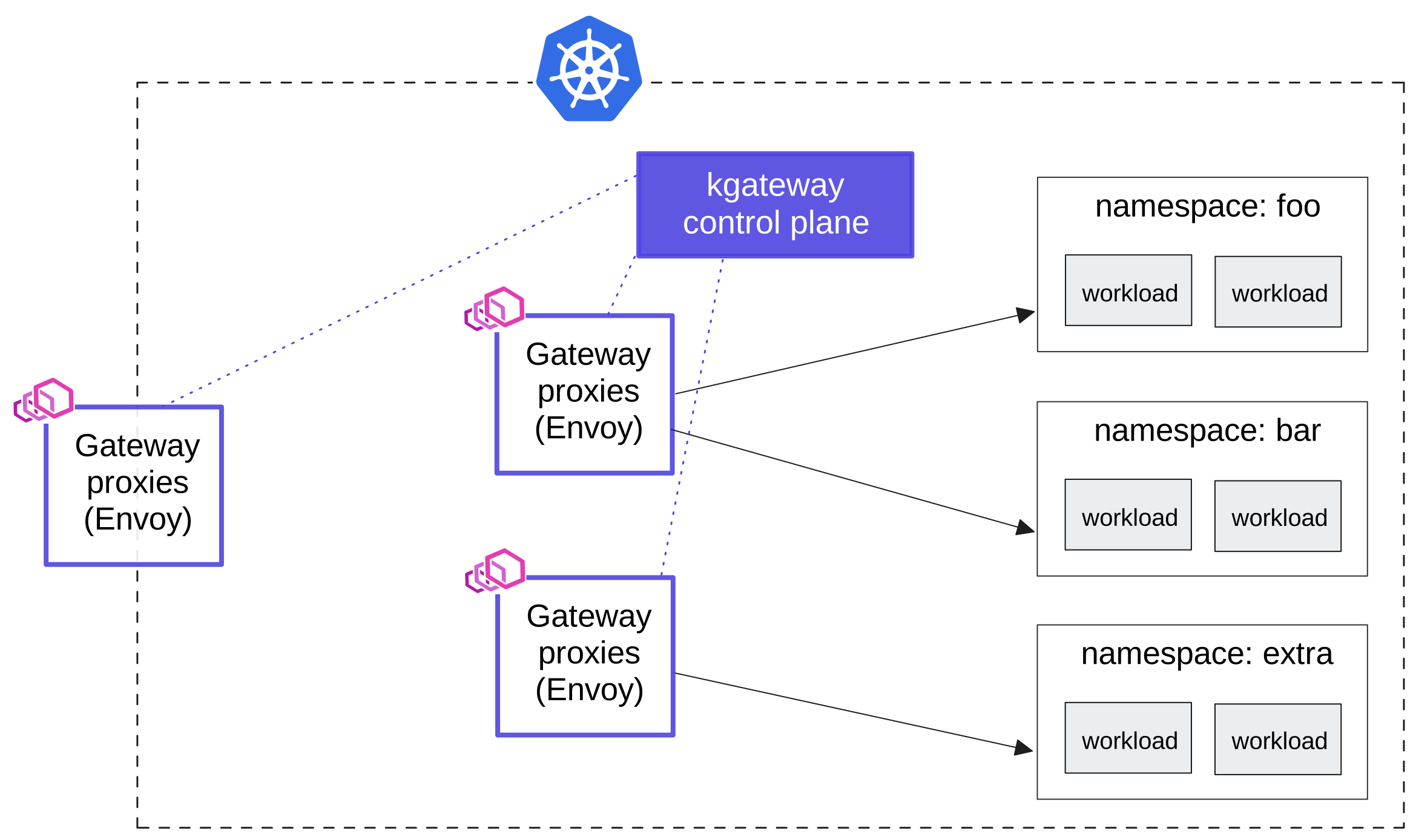
This pattern combines a central ingress gateway proxy with a second layer of sharded gateway proxies. The central gateway applies common traffic management, resiliency, and security rules, while the second layer handles traffic for specific apps, teams, or namespaces. This is ideal if you need a central IP address and DNS name for the gateway that serves all your traffic.
Kgateway can also be paired with other proxy types, such as HAProxy or AWS NLB/ALB, as your central ingress endpoint.
API Gateway for a Service Mesh: Istio Ambient Mesh Integration
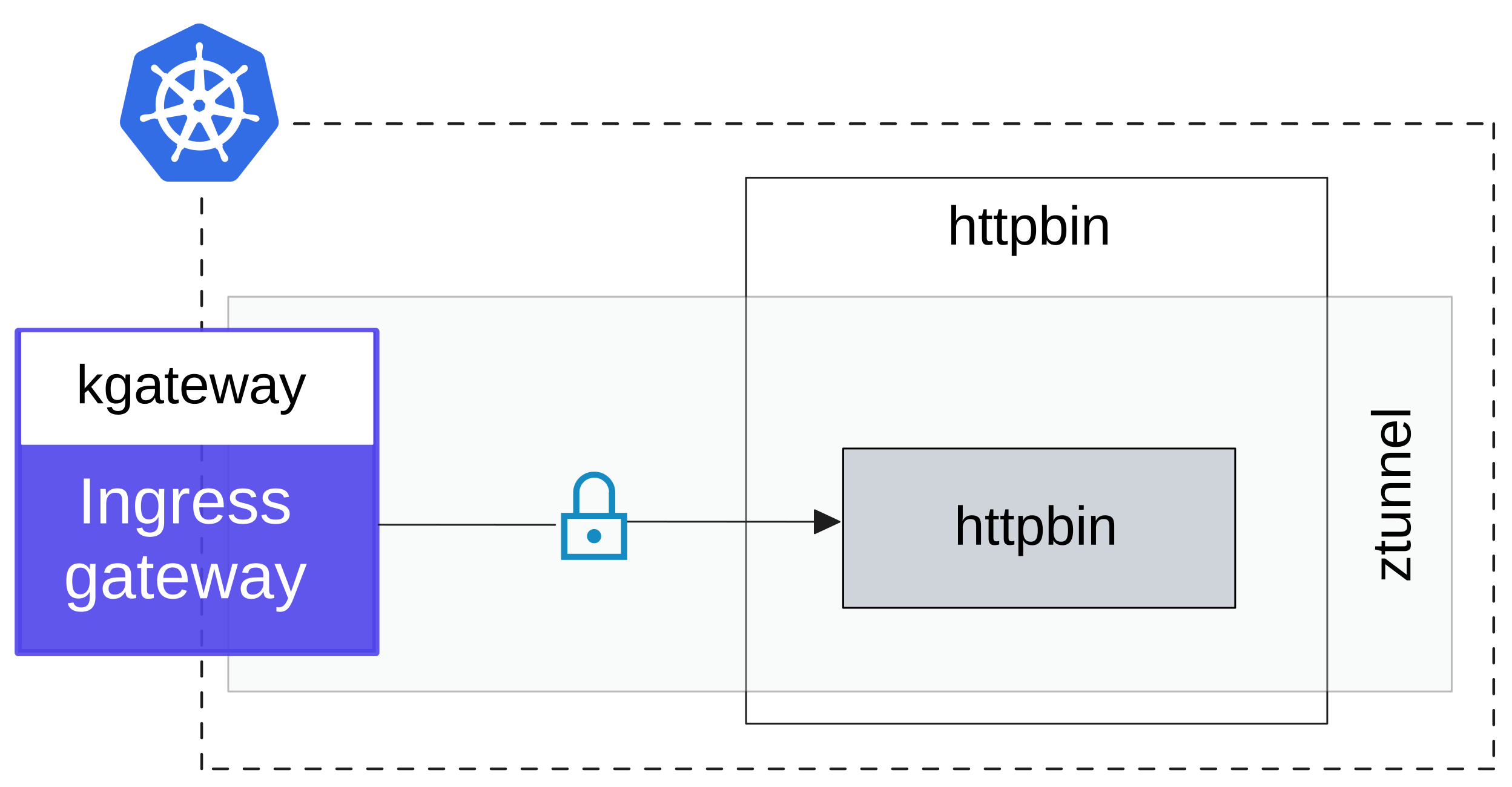
Kgateway can be deployed as an ingress, egress, or waypoint proxy gateway for workloads in an Istio ambient mesh. This allows you to leverage Kgateway's features within your service mesh environment.
For more details, refer to the guides for using Kgateway as an ingress or waypoint proxy for your ambient mesh.
Kubernetes Gateway API Success with kgateway
Kgateway is a powerful and versatile tool for managing traffic in your Kubernetes environment. Whether you're running a small cluster or a large, complex infrastructure, Kgateway provides the features and flexibility you need to ensure secure, reliable, and efficient communication between your services. So, go ahead and give Kgateway a try – your microservices will thank you!
Learn more