

Microsoft trae coreutils al estilo Linux de forma nativa a Windows
¿Es esto una "Linux-ización" de Windows? No exactamente. Es más bien un puente pragmático.
Jun 5, 2026
Takes about 3 minutes to read

Is this a "Linux-ification" of Windows? Not quite. It's more of a pragmatic bridge.
Microsoft brings Linux-style coreutils natively to Windows
Is this a "Linux-ification" of Windows? Not quite. It's more of a pragmatic bridge.
Coreutils for Windows won't make you forget you're on Windows, and it won't replace the need for a full WSL instance when you're doing heavy-duty Linux systems engineering. However, for the developer who just wants to grep a log file or find a config without fighting the shell, it is a massive quality-of-life improvement.
For years, the relationship between Microsoft and the Linux ecosystem was one of mutual suspicion and occasional hostility. Fast forward to 2026, and the irony is palpable: Microsoft is now officially shipping Unix-style utilities to make Windows feel a little more like the environments developers actually live in.
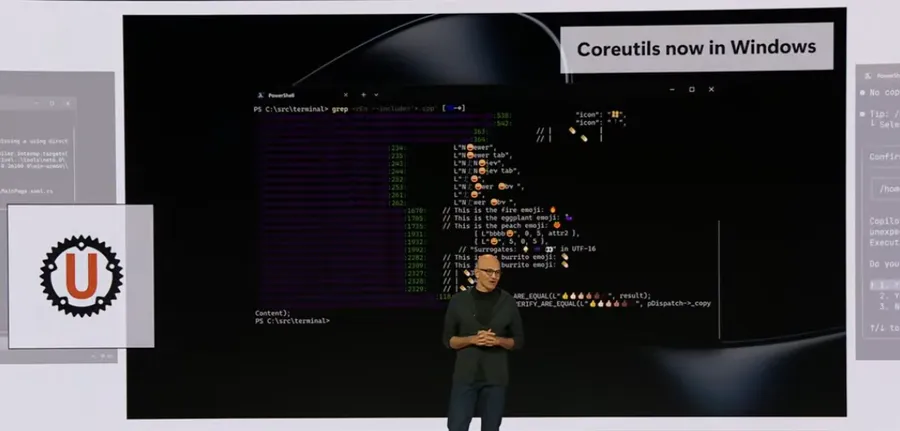
Announced at Microsoft Build 2026, Coreutils for Windows is a new, Microsoft-maintained suite of command-line tools designed to run natively on Windows. No WSL required, no heavy virtualization layers—just your familiar commands, running directly on the Windows kernel.
Rather than attempting a messy port of aging GNU C code, Microsoft has gone the modern route. Coreutils for Windows is built upon uutils, a cross-platform, high-performance reimplementation of GNU Coreutils written in Rust.
By leveraging Rust, Microsoft is tapping into the language's inherent memory safety and concurrency strengths, which is a smart move for system-level utilities. The package is distributed as a single, multi-call binary and includes Microsoft-maintained builds of:
uutils/coreutilsuutils/findutilsuutils/grepThe goal is to reduce the "context-switching tax" paid by DevOps engineers and SREs who bounce between local Windows workstations, macOS laptops, and Linux-based cloud environments.
Getting started is straightforward, assuming you aren't still clinging to the legacy CMD prompt. The package is distributed via WinGet, making it easy to integrate into automated setup scripts or developer onboarding workflows.
# Install the coreutils package via WinGet
winget install Microsoft.Coreutils
Note: To get the most out of this, you will need PowerShell 7.4 or later. If you are still running Windows PowerShell 5.1, you might want to upgrade before you start expecting modern behavior.
Before you go rewriting all your .bat scripts, let's manage some expectations. This is not a complete, 1:1 replacement for a Linux distribution. It is a "Windows-focused subset."
Because Windows has its own way of doing things, several common commands will collide with existing PowerShell or CMD built-ins and aliases. If you try to use ls, cat, cp, mv, rm, or pwd, you might find yourself in a tug-of-war between the native Windows behavior and the new Coreutils implementation. You'll need to be mindful of your environment's execution policy and alias precedence.
Microsoft has been quite selective about what they include. While the "essentials" are there, many power-user tools have been left on the cutting room floor.
Explicitly excluded utilities:
dd (Because direct disk manipulation on Windows is a recipe for disaster)dircolorsshredsyncunameMissing POSIX-specific tools:
If your workflow relies heavily on permission management or process inspection, you'll notice the absence of chmod, chown, chroot, mkfifo, tty, users, and who. Attempting to map POSIX permissions to the NTFS filesystem is a complex beast, and it seems Microsoft has decided to punt that particular headache for another day.
The release of Coreutils for Windows isn't happening in a vacuum. Alongside this, Microsoft introduced WSL containers.
While Coreutils aims to make the Windows CLI more familiar, WSL containers aim to make Linux containerization more native. Unlike the Coreutils package, WSL containers are currently in the works and are expected to enter public preview in the coming months. They promise a way to build and run Linux containers through a dedicated CLI and API, providing enterprises with policy-based control over image sources and host interaction—essentially bringing the "managed" feel of cloud-native environments to the local Windows desktop.
Coreutils for Windows is available now via the Microsoft GitHub repository
References & Credits:
¿Es esto una "Linux-ización" de Windows? No exactamente. Es más bien un puente pragmático.

Multipass es la herramienta perfecta para levantar clústeres de Kubernetes locales y desechables. ¿Necesitas probar algo rápido? ¿Una demo? ¿O simplemente quieres cachurear sin ensuciar tu máquina principal? Multipass es tu mejor amigo.