Cyclops: A Kubernetes UI to easily create YAML templates
Cyclops: Your Friendly Kubernetes UI
Ah, Kubernetes. The container orchestration platform that everyone claims to understand. If you're tired of wrestling with YAML files and deciphering cryptic kubectl commands, then buckle up, because Cyclops is here to save the day, and your sanity, so you don't
Ah, Kubernetes. The container orchestration platform that everyone claims to understand. If you're tired of wrestling with YAML files and deciphering cryptic kubectl commands, then buckle up, because Cyclops is here to save the day, and your sanity, so you don't have to become Odysseus, let the Cyclops do ir for you.
Cyclops is more than just a pretty UI for Kubernetes. It's a testament to the idea that powerful tools don't have to be intimidating. Whether you're a seasoned Kubernetes veteran or just starting your journey, Cyclops provides an accessible and enjoyable way to interact with the complexities of container orchestration.
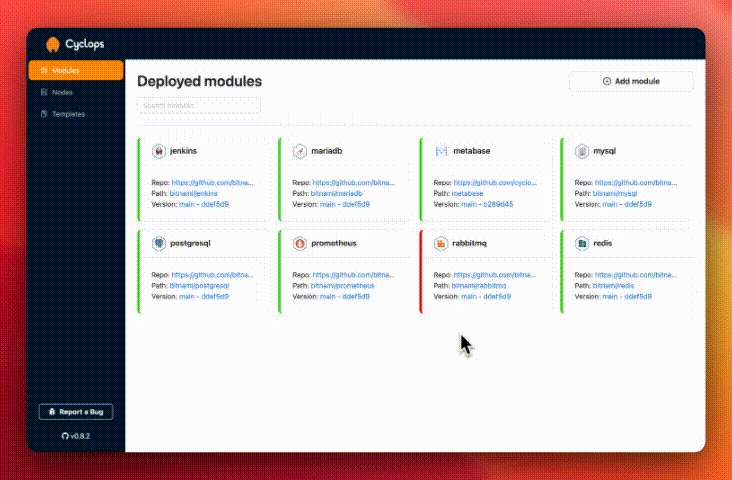
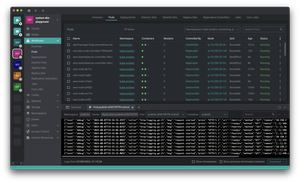
Cyclops is an open-source developer tool that wraps a shiny, user-friendly UI around the complexities of Kubernetes. Think of it as the benevolent intermediary between you and the YAML gods. With Cyclops, you can:
Kiss YAML goodbye (almost): Configure and deploy applications through an intuitive interface, leaving YAML where it belongs – in the depths of configuration hell.
Embrace the power of templates: Cyclops's template system lets you define configurations with ease, turning what would normally be a multi-day YAML-wrangling marathon into a few satisfying clicks.
Empower your team: Cyclops isn't just for seasoned Kubernetes veterans. It empowers developers of all skill levels to interact with Kubernetes without needing to become YAML whisperers.
How Does Cyclops Work Its Magic?
Cyclops achieves its developer-friendly magic through the use of Helm charts. This means you can leverage your existing Helm charts or tap into the vast library of public Helm charts available.
Think of Cyclops as a Helm chart wizard, guiding you through the process of deploying and managing applications without the usual headaches.
Getting Started with Cyclops
Before you embark on your Cyclops adventure, make sure you have the necessary prerequisites in place. You can find a handy checklist on the official Cyclops documentation.
Once you're all set, you can install Cyclops using kubectl:
Cyclops comes pre-loaded with a collection of handy templates to get you started. These templates provide a framework for deploying common applications and services, saving you from reinventing the wheel (or the YAML file).
For those who like to get their hands dirty (or just really love customization), Cyclops allows you to create your own templates. You can explore the existing templates in the Cyclops templates repository for inspiration and guidance.
Meet cyctl: The Cyclops CLI
No self-respecting Kubernetes tool would be complete without a command-line interface, and Cyclops is no exception. Enter cyctl, the Cyclops CLI, ready to streamline your Cyclops experience.
You can install cyctl using Homebrew:
brew install cyctl
cyctl empowers you to:
Manage modules and templates: Retrieve lists of available modules and templates.
Automate Cyclops workflows: Integrate cyctl with GitHub Actions to automate tasks like deploying new templates.
Contributing to the Cyclops Community
Cyclops is a shining example of the power of open source. If you're feeling generous (or just want to show off your mad coding skills), there are plenty of ways to contribute:
Code contributions: Dive into the codebase and help squash bugs, implement new features, or improve existing ones.
Feedback and suggestions: Share your thoughts, ideas, and pain points with the Cyclops team.
Content creation: Spread the Cyclops love by writing blog posts, tutorials, or documentation.
GitHub stars: Show your appreciation by giving the Cyclops repository a star. Every star counts!
The Road Ahead for Cyclops
The Cyclops team has an ambitious roadmap for the future, with plans for:
Enhanced security: Authentication and role-based access control to keep your Kubernetes clusters safe and sound.
GitOps integration: Seamless integration with GitOps tools for streamlined workflows.
Kustomize support: Expanding template creation beyond Helm to include Kustomize.
Windows support for cyctl: Bringing the power of cyctl to Windows users.
So, ditch the YAML files, embrace the UI, and join the Cyclops revolution!