Is OrbStack for you? Exploring Container Options for macOS: OrbStack, Lima and Docker Desktop
macOS users have several solid options for running containers, each with its own strengths. We review OrbStack, Lima (Linux Machines), and Docker Desktop, comparing their features, performance, and ease of use to help you choose the best fit for your development workflow. Whether you're a seasoned Kubernetes veteran
macOS users have several solid options for running containers, each with its own strengths. We review OrbStack, Lima (Linux Machines), and Docker Desktop, comparing their features, performance, and ease of use to help you choose the best fit for your development workflow. Whether you're a seasoned Kubernetes veteran or just starting your container journey, we'll explore which tool might be your new best friend for running containers in macOS.
The Container Craze: Why We Love 'Em
Containers have taken the development world by storm, and for good reason. They package applications and their dependencies into neat, portable units, making it a breeze to move software between different environments without compatibility nightmares. This portability is a godsend for developers, allowing them to build and test applications in consistent environments that closely mirror production.
Docker Desktop: The Reigning Champion (Well, Sort Of)
Docker Desktop has long been the go-to choice for running containers on macOS. Its user-friendly interface and tight integration with popular development tools made it a favorite among developers. However, recent changes to Docker Desktop's licensing, particularly for large organizations, have left some users searching for alternatives.
Enter the Challengers: OrbStack and Lima
Two contenders have emerged, aiming to dethrone Docker Desktop and capture the hearts of macOS developers:
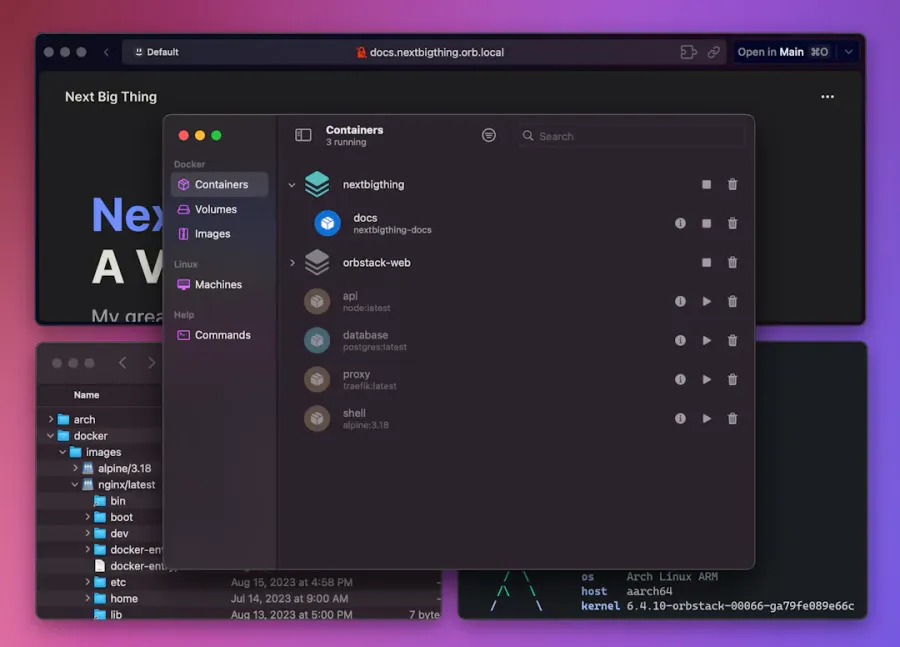
OrbStack: This newcomer focuses on speed and efficiency. Built on Rust, it boasts impressive performance and a lightweight footprint. OrbStack aims to provide a seamless development experience with features like a built-in Kubernetes cluster and support for Docker Compose.
Lima: A veteran in the open-source world, Lima offers flexibility and customization. It allows you to create Linux virtual machines specifically tailored for running containers, giving you granular control over your development environment. Lima might appeal to developers who prefer a more hands-on approach and want to tinker with their setup.
Let's break down the key differences between OrbStack, Lima, and Docker Desktop:
Feature
OrbStack
Lima
Docker Desktop
Performance
Extremely fast, thanks to its Rust-based architecture
Good performance, but can vary depending on the virtual machine configuration
Good performance, but can be resource-intensive
Ease of Use
User-friendly interface and simple setup
Requires some command-line knowledge; more configuration needed
User-friendly interface and easy setup
Features
Built-in Kubernetes, Docker Compose support, port forwarding
Highly customizable, supports different Linux distributions
Comprehensive features, including Kubernetes support, image building, and vulnerability scanning
Cost
Free for personal use; paid plans for teams
Open-source and free
Free for personal use and small teams; paid plans for larger organizations
Choosing Your Champion: Which One's Right for You?
The best container engine for your macOS development workflow depends on your specific needs and priorities:
Speed Demons: If raw performance is your top priority, OrbStack's blazing-fast speeds might make it your ideal choice.
Control Freaks: For developers who crave customization and enjoy getting their hands dirty with configuration, Lima's flexibility could be a perfect match.
Ease-of-Use Enthusiasts: If you prefer a user-friendly interface and a streamlined experience, Docker Desktop remains a solid option, especially for those already familiar with its ecosystem.
0:00
/0:45
Let's Get Practical: Installing and Running a Simple App
To give you a taste of each option, let's walk through installing a simple web application using OrbStack, Lima, and Docker Desktop.
OrbStack
Installation: Download the OrbStack installer or use Homebrew and just run:
brew install orbstack
Running a Container: Once installed, open your terminal and run the following command to start an Nginx web server in a container:
orbstack run -d -p 80:80 nginx:latest
Accessing Your App: Open your web browser and navigate to http://localhost. You should see the default Nginx welcome page.
open http://localhost
Lima
Installation: Install Lima using Homebrew:
brew install lima
Creating a Lima Instance: Create a Lima instance with Docker pre-installed:
Connecting to the Instance: Connect to your Lima instance:
limactl shell my-lima-instance
Running a Container: Now, you can run Docker commands as usual:
docker run -d -p 80:80 nginx:latest
Accessing Your App: Since Lima runs in a virtual machine, you'll need to find its IP address to access your app. Run
# to find the IP address of your my-lima-instance

limactl list

# and then open it in your web browser

open http://$my-lima-instance-ip
Docker Desktop
Installation: Download the Docker Desktop installer from the Docker website and follow the installation instructions.
Accessing Your App: Open your web browser and navigate to http://localhost. You should see the Nginx welcome page.
Running a Container: Open your terminal and run the following command:
docker run -d -p 80:80 nginx:latest
The Container Landscape: A Constantly Evolving World
The world of containers is constantly evolving, with new tools and technologies emerging all the time. While this article focused on OrbStack, Lima, and Docker Desktop, it's worth exploring other options like Rancher Desktop and Podman to find the perfect fit for your development needs.
The key is to experiment, try different tools, and choose the one that empowers you to build, ship, and run your applications with ease and efficiency. Happy coding!
Special Mention: Podman Desktop
Well, there is always another option, right? Podman Desktop also runs very well on macOS, read more: